
 LMS
LMS
 Reels Series
The Role of CRM Workflow Automation in Building Stronger Customer Relationships
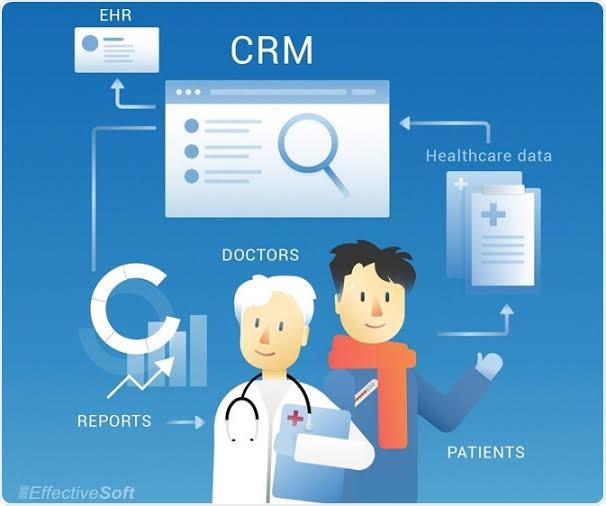
Building strong customer relationships requires more than having a good product or providing responsive support. Customers increasingly expect businesses to understand their needs, respond on time, and provide a consistent experience across every interaction. As customer databases become larger and communication becomes more complex, CRM workflow automation can help businesses maintain that consistency without placing every responsibility on employees.
Automation allows CRM systems to perform routine actions based on customer activity, business rules, and changes in account information. When implemented properly, these workflows can help teams stay organized while giving employees more time to focus on conversations and relationships that require a human touch.
Why Customer Relationships Become Harder to Manage at Scale
A small business may know its customers personally and remember important details about individual accounts. As the organization grows, that becomes much harder.
More customers mean more:
-
Emails
-
Sales conversations
-
Support requests
-
Follow-up activities
-
Renewals
-
Meetings
-
Account updates
-
Internal handoffs
Without a structured system, important information can become scattered across inboxes, spreadsheets, notes, and different applications.
A CRM provides a central place for customer information, but automation can make that information more useful by connecting it to specific actions.
Turn Customer Information Into Action
A CRM should not simply store customer data.
It should help teams understand what needs to happen next.
For example, when a customer submits a request, an automated workflow could assign the appropriate task to a team member. When a sales opportunity reaches a certain stage, the CRM could create a follow-up activity. When an existing customer approaches a renewal period, the account team could receive a notification.
This is where a workflow automation CRM can become an operational tool rather than simply a customer database.
The system helps translate customer information into repeatable actions.
1. Create Faster Responses to Customer Inquiries
Customers do not always expect an immediate solution, but they generally appreciate knowing that their request has been received and is being handled.
Automation can help businesses create faster initial responses.
For example, when a new inquiry enters the CRM, the system can:
-
Create a customer record
-
Assign the inquiry
-
Notify the appropriate employee
-
Create a response task
-
Categorize the request
-
Record the source of the inquiry
Employees can then focus on providing a useful response rather than completing administrative steps first.
2. Personalize Follow-Up Without Losing Consistency
Automation and personalization are not opposites.
A CRM with workflow automation can help teams create consistent processes while still allowing employees to personalize communication.
For example, a workflow could identify customers who have not interacted with the business recently and create a follow-up task for the account manager.
The system does not have to send the same generic message to everyone.
Instead, it can remind the employee to review the account and choose an appropriate communication based on the customer's history.
This approach keeps automation behind the scenes while preserving a human customer experience.
3. Recognize Important Customer Milestones
Customer relationships often have important milestones.
These may include:
-
First purchase
-
Contract renewal
-
Product upgrade
-
Service anniversary
-
New account activation
-
Support resolution
-
Repeat purchase
Businesses can create automated workflows around these events.
For example, when a contract approaches its renewal period, the CRM can automatically create an account review task.
When a new customer completes onboarding, the system can notify the customer success team to schedule a check-in.
Small actions like these can help businesses stay engaged with customers throughout the relationship.
4. Connect Sales, Marketing, and Customer Service
Customers do not experience businesses according to internal department structures.
A customer may first interact with marketing, then speak with sales, and later contact customer service. If these departments operate with disconnected information, the customer may have to repeat the same details multiple times.
CRM automation can help create a connected customer journey.
With appropriate CRM integration services, information can move between CRM systems and other business applications.
For example, marketing activity can inform sales conversations, while customer service interactions can provide account teams with additional context.
The result can be a more complete view of the customer.
5. Use Customer Activity to Trigger Workflows
Customer behavior can provide useful signals.
For example, a customer may:
-
Visit a product page
-
Submit a contact form
-
Download a resource
-
Request pricing
-
Open a support case
-
Upgrade an account
-
Stop using a service
These events can potentially trigger different workflows.
A pricing request might create a sales follow-up task. A support request might trigger a service workflow. A renewal signal might notify an account manager.
This allows businesses to respond to customer activity instead of relying entirely on manual monitoring.
6. Improve Customer Handoffs
Customer relationships often involve several employees.
A sales representative may close a deal, after which an onboarding specialist takes responsibility. Later, an account manager may become the primary contact.
These handoffs can create gaps if information is not transferred properly.
Automation can create standardized handoff processes.
When a deal is closed, the CRM can automatically:
-
Update the customer status.
-
Create an onboarding task.
-
Notify the appropriate team.
-
Transfer relevant information.
-
Set deadlines for key activities.
The customer does not need to know which internal team owns each step. They simply experience a more organized process.
7. Use AI to Understand Customer Signals
Artificial intelligence can add another layer to customer relationship management.
AI can help businesses analyze customer interactions, identify patterns, summarize conversations, and surface information that might otherwise be difficult to notice.
This can be particularly useful when customer records contain large amounts of information.
Businesses exploring AI CRM integration services can connect AI capabilities with existing customer workflows.
For example, an AI system may identify a pattern of declining engagement, while the CRM automatically creates a task for the account team to review the customer.
The AI identifies a potential signal. Automation helps turn that signal into action.
8. Support Better Customer Retention
Retention often depends on noticing problems before they become serious.
A customer who stops engaging, submits repeated support requests, delays renewal discussions, or reduces usage may need additional attention.
CRM workflows can help identify these situations based on predefined conditions.
For example:
Reduced engagement → Account flagged → Manager notified → Customer review task created
This does not mean every automated alert will represent a customer at risk.
The purpose is to give employees useful signals so they can investigate and decide what action is appropriate.
9. Make Customer Service More Organized
Customer service teams often manage high volumes of repetitive requests.
Automation can help route cases, assign tasks, update statuses, and notify employees when deadlines approach.
For more complex environments, integrations can connect customer service platforms with CRM records and other business systems.
Businesses using Microsoft platforms may consider Microsoft Dynamics CRM integration services when they need customer information and workflows to work across Dynamics and connected applications.
A connected environment can help employees access relevant information without constantly switching between systems.
10. Reduce Repetitive Customer Data Management
Accurate customer information is essential for meaningful interactions.
However, employees often have to update the same information in multiple places.
Integration and automation can reduce this repetition.
For example, when a customer changes certain account information, an integrated workflow may update connected systems where appropriate.
This can help reduce inconsistencies and give teams a more reliable view of customer data.
For organizations with complex technology environments, CRM integration and implementation services can help plan these connections and ensure they align with business processes.
Automation Should Support Human Relationships
One of the biggest misconceptions about CRM automation is that it is intended to remove human interaction.
That is rarely the best approach.
Customer relationships involve empathy, negotiation, creativity, and problem-solving. These are areas where people remain essential.
Automation is most useful when it removes repetitive administrative work surrounding those interactions.
For example, a CRM can remind an account manager that a customer needs attention. The account manager still decides how to have the conversation.
The system can create a follow-up task. The employee determines the most appropriate message.
This creates a balance between operational efficiency and genuine customer engagement.
How AI Sales Automation Can Support Customer Growth
Businesses also need to think about the relationship between sales efficiency and long-term customer value.
Many organizations ask how ai sales automation tools help small businesses increase revenue.
AI-supported sales processes can help teams identify promising opportunities, analyze customer behavior, summarize interactions, and prioritize follow-ups. When these insights are connected to automated CRM workflows, sales representatives can spend more time on high-value activities.
For small businesses in particular, this can help make limited sales resources more productive without requiring every process to be managed manually.
Choose Automation Based on Customer Needs
Not every customer interaction needs automation.
Businesses should identify moments where automation can genuinely improve the experience.
Good candidates often include:
-
Routine follow-up reminders
-
Lead routing
-
Customer onboarding tasks
-
Renewal notifications
-
Internal handoffs
-
Support case assignment
-
Data synchronization
-
Important account alerts
The objective should always be to make the customer journey easier and the employee workflow clearer.
Measure the Customer Experience
After implementing automation, businesses should evaluate its impact.
Useful measurements may include:
-
Response time
-
Customer retention
-
Renewal rate
-
Support resolution time
-
Customer satisfaction
-
Follow-up completion
-
Account engagement
-
Lead conversion
-
Customer lifetime value
These metrics can show whether automation is improving the actual customer experience rather than simply increasing the number of automated actions.
Build a Customer-Centered CRM Strategy
Technology works best when it supports a clear business strategy.
Businesses should map their customer journey, identify important interaction points, document internal processes, and determine where automation can create measurable value.
As the company grows, workflows should also be reviewed regularly.
A process that works for a small customer base may need to change when the business expands. New applications may also require additional integrations, while older workflows may need to be updated or removed.
CRM automation should therefore be treated as an ongoing improvement process rather than a one-time implementation.
Conclusion
Strong customer relationships depend on timely communication, reliable information, consistent follow-up, and coordinated teams. CRM workflow automation can help businesses deliver these elements more effectively by turning customer activity and business rules into organized actions.
From faster inquiry management and personalized follow-ups to AI-supported customer insights, integrated systems, and automated handoffs, businesses can use automation to strengthen both operational efficiency and customer experiences. The goal is not to replace human relationships but to give employees better tools for managing them. With the right strategy and implementation approach, Soft-korner can help businesses build CRM automation and integration solutions that support stronger customer relationships as they grow.
FAQs
1. Can CRM workflow automation improve customer experience?
Yes. Automation can help businesses respond faster, maintain consistent follow-ups, organize customer information, and ensure important tasks are not overlooked.
2. Does CRM automation replace human customer service?
No. Effective automation handles repetitive administrative tasks while employees continue to manage conversations, complex requests, relationship building, and important decisions.
3. How can automation support customer retention?
Automated workflows can identify predefined customer signals, such as reduced engagement or upcoming renewals, and alert account teams so they can investigate and take appropriate action.
4. What role does AI play in CRM automation?
AI can help analyze customer information, identify patterns, summarize interactions, prioritize opportunities, and surface potential customer signals that can then trigger appropriate workflows.
5. How should a business begin automating customer workflows?
Start by mapping the customer journey and identifying repetitive processes that frequently cause delays or require manual administrative work. Businesses can then prioritize the workflows with the clearest customer and operational benefits.
 English
 Arabic
 French
 Spanish
 Portuguese
 Deutsch
 Turkish
 Dutch
Dutch
 Italiano
 Russian
 Romaian
 Portuguese (Brazil)
 Greek
Greek